Standalone 2 of 2 17 min read
The JSON parsed. Is it right?
Structured outputs all but guarantee the shape of an extraction. Whether the answer is right is yours to score. How to score an LLM, a regex and the publisher's data, then keep what passes per field.
How this is checked 71 claims · 18 verified at the source · last checked 15 Nov 2026 The claim ledger 71 claims in
its ledger Checked 15 Nov 2026 How this is checked
- What would prove it wrong
-
- If a reader runs the shipped scorer on our saved outputs and gets different per-field counts from the guide's results grid, then the grid is wrong and the piece is pulled until it is fixed.
- If a person checking the 120 answer-key cells finds a disagreement that changes a verdict, then the results section changes and the piece says so.
- If current models (e.g. gpt-6-luna) pass the bar on the same 20 documents, then the guide's results are dated, and the update says so; the method claim (score it) does not depend on any model failing.
Re-checked 15 Nov 20261 holding2 untestedThe re-check
- Evidence
- 71 claims: 18 verified at the primary source, 52 from runs made for the piece, 1 reported and 2 struck before publication.
Structured outputs all but guarantee the shape of an extraction. Whether the answer is right is yours to score. How to score an LLM, a regex and the publisher’s data, then keep what passes per field.
We had Gemini, one of three LLM runs, pull six fields from 20 Federal Register notices with a JSON Schema enforced. Every reply was valid, and 116 of the 120 values were right. It still failed: our bar allows no value in a field that should be empty, and it filled four.
All four sat on two correction notices, and each was real text from the document. One IRS notice exists only to change a date in another document, from 16 October to 26 October. Gemini returned 26 October as the notice’s own comment deadline. Nothing in the valid JSON flagged the mistake.
The risky moment comes when the JSON parses and you stop looking. This guide is about what to do instead: score any tool on your own documents, pick one per field, and know when to score again.
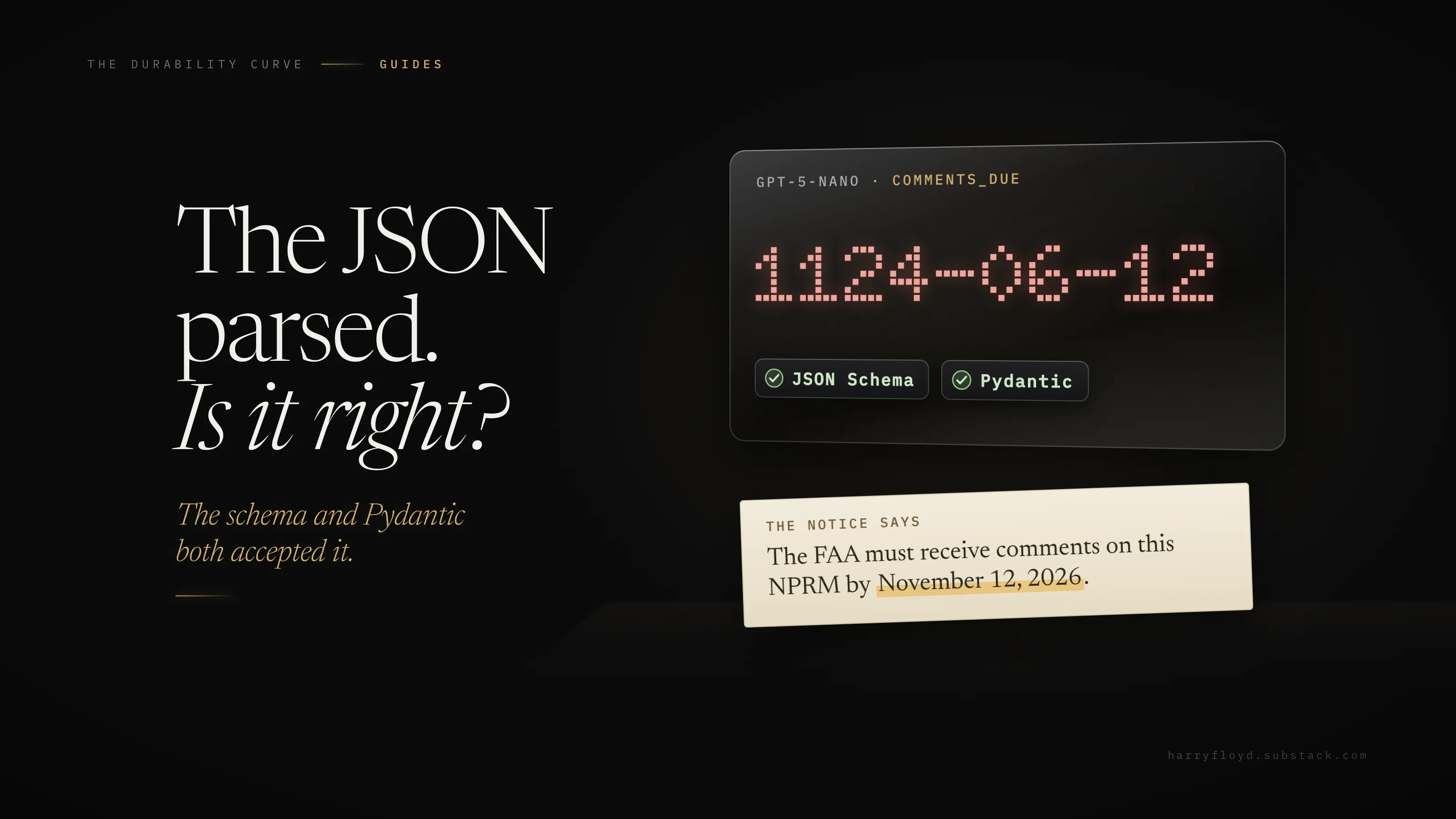
The short version: a schema all but guarantees the JSON’s shape; validation checks the values are usable; nothing guarantees they’re true. On 20 Federal Register notices, three schema-enforced LLM runs were valid everywhere and none passed our bar; the publisher’s data passed on its three fields, on our answer key. Score per field, on your own 20 rows, with one script for every tool.
About the results: one run per setup on 8 October 2026, two small models, 20 documents. An AI agent built the answer key; two other models, GPT-5.6 and Claude Opus 5.5, re-keyed all 120 cells without seeing it and matched every one, and the Federal Register’s own data agrees on 113. Section 5 says how, and the checks ship with the download.
Watch it fail
The documents are ten Rules and ten Proposed Rules from 28 and 29 September 2026, via the public Federal Register API. Most are regular: ten are FAA airworthiness directives on one template. The traps sit in four. Two are correction notices, and one of those has no AGENCY: or ACTION: line. A HUD fee announcement calls its date an “applicability date”. An EPA proposal lists three deadlines in its DATES section.
The obvious approach: describe the JSON in the prompt and call json.loads on the reply.
PROMPT = """Read this Federal Register document and return JSON with these keys:
agency, action, docket_id, rin, effective_date, comments_due.

DOCUMENT:
{text}"""
Against google/gemini-2.5-flash-lite, all twenty replies came back wrapped in a markdown code fence, so json.loads failed twenty times out of twenty.
That failure is easy: your code crashes and you notice. Strip the fences and thirteen of the twenty still fail a typed schema, every one on a date: the model wrote October 28, 2026 in one row and 2026-10-28 in another, in the same run.
openai/gpt-5-nano with the identical prompt shows the harder kind. Its replies were bare JSON, so all twenty parsed. Nine failed the schema, all on date formats. One was an IRS correction, where it put October 26, 2026 in both date fields. Validation caught the format. It had no way to catch the mistake.
The worrying row passed. A MARAD correction’s DATES: line is a bare September 28, 2026, with no label. The model returned it as the effective date: valid, typed, and wrong by our answer key, which leaves it empty. (That’s a judgement call, and section 7 shows what it changes.)
So prompting for JSON fails two ways: it won’t parse, or it parses and is wrong. The rest of this guide is about the second.
The newsletter · Free
Subscribe to get each new piece in your inbox, with something to use in every one.
Several essays a week, plus Notes through the week.
Signup completes on Substack. Unsubscribe from any email.
Shape, usable, true
None of the three implies the next.
Shape
The schema guarantees shape, almost always. OpenAI’s docs say Structured Outputs “constrains completed, non-refusal model output to your supplied JSON Schema”. Anthropic’s say structured outputs “guarantee schema-compliant responses through constrained decoding”. Both list the exceptions: a refusal, or a reply cut off at the token limit, can break the shape. Your validation catches those.
Usable
Validation checks the value is usable: the right type, within the limits you set. Google’s Gemini docs: “While output is syntactically correct JSON, always validate values in your application.” They also say to handle “schema-compliant but semantically incorrect outputs”.
True
Nothing guarantees the value is true. A 2026 benchmark of 21 models, The Structured Output Benchmark, found near-perfect schema compliance, and the best exact match on values from text was 83.0%. One of our runs wrote 1124-06-12 for a deadline of 12 November 2026, and both the schema and Pydantic accepted it.
That’s what a score is for. A blank is visible. A deadline from the wrong place looks exactly like the right one. A failed call recorded as empty looks like a blank. Count the three apart, on rows you checked, against a bar you set first.
Below, for free subscribers: the schema and the call, the scorer and its seven outcomes, our full results, what to do after a FAIL, and the download with the code, the 20 documents and every raw reply.
A schema with types and nulls
from datetime import date
from typing import Optional
from pydantic import BaseModel, ConfigDict, Field

class FRDocument(BaseModel):
    model_config = ConfigDict(extra="forbid")   # additionalProperties: false

    agency: Optional[str] = Field(description="Issuing agency as named on the "
        "AGENCY: line, full name, without abbreviation in brackets or parent "
        "department. null if no AGENCY: line.")
    action: Optional[str] = Field(description="Text of the ACTION: line, "
        "without the trailing full stop. null if absent.")
    docket_id: Optional[str] = Field(description="The first docket identifier "
        "in the square-bracketed line under the CFR part, without 'Docket No.' "
        "and without anything in parentheses. null if absent.")
    rin: Optional[str] = Field(description="Regulation Identifier Number, "
        "e.g. 2120-AA64, without 'RIN'. null if absent.")
    effective_date: Optional[date] = Field(description="Date the DATES: section "
        "says this rule is effective or applicable. null if no such date for "
        "this document.")
    comments_due: Optional[date] = Field(description="Deadline for public "
        "comments on this document, from its DATES: section. Ignore paperwork "
        "(OMB) and hearing-request deadlines. null if none.")

def strict_json_schema() -> dict:
    s = FRDocument.model_json_schema()
    s["required"] = list(s["properties"])        # every key required...
    s["additionalProperties"] = False
    return s                                      # ...but every value nullable
These are the exact descriptions our first two runs sent (schema.py). The third drops format: date and adds “Format YYYY-MM-DD.” to both date descriptions. Three choices matter.
Every field is required, and every field can be null. “Not in the document” must come back as an explicit null. You can count a null. You can’t count a key that silently vanished.
The descriptions are the rules. Write each one as an instruction: which date counts, what to ignore. If you can’t define a field in a sentence, you can’t score it.
Dates are dates. Pydantic’s date type rejects November 2, 2026, and it accepts 1124-06-12, because 1124 is a real year. So check the value is plausible too, with a window that fits the field: here, a year either side of the document’s publication date, though some rules take effect years later.
When a date falls outside the window, drop that key from the row, so score.py scores that one field failed; setting it to null would make a caught error look like a blank. The download’s plausible_dates.py does this, and on our runs it drops all eight wrong-year dates and nothing else. It can’t catch a plausible date from the wrong place, and section 6 has two.
One worked extraction
The call sends the schema, then validates the reply.
MAX_CHARS = 8000   # the preamble (AGENCY, ACTION, DATES) sits near the top
SYSTEM = ("You extract fields from US Federal Register documents. "
          "Follow the field descriptions in the schema exactly. "
          "If a field is not stated in the document, return null. Do not guess.")

body = {
    "model": model,                       # e.g. "openai/gpt-5-nano"
    "messages": [{"role": "system", "content": SYSTEM},
                 {"role": "user", "content": text[:MAX_CHARS]}],   # text = the document
    "response_format": {"type": "json_schema",
                        "json_schema": {"name": "fr_document", "strict": True,
                                        "schema": strict_json_schema()}},
}
reply = chat(body)["choices"][0]["message"]["content"]   # chat(): gateway.py
row = FRDocument.model_validate_json(reply)   # raises if anything is off
Document 2026-19757 is an FAA airworthiness directive. The lines that matter:
[Docket No. FAA-2026-11786; Project Identifier MCAI-2026-00439-R; ...]
RIN 2120-AA64
AGENCY: Federal Aviation Administration (FAA), DOT.
ACTION: Final rule; request for comments.
DATES: This AD is effective October 13, 2026. ...
       The FAA must receive comments on this AD by November 12, 2026.
What gemini-2.5-flash-lite returned with the schema enforced:
{
  "agency": "Federal Aviation Administration (FAA), DOT",
  "action": "Final rule; request for comments",
  "docket_id": "FAA-2026-11786",
  "rin": "2120-AA64",
  "effective_date": "2026-10-13",
  "comments_due": "2026-11-12"
}
Five fields match our answer key exactly. agency doesn’t: the model kept “(FAA), DOT” although the description said to drop it. Whether that counts as wrong depends on a rule you write down. Section 5 sets that rule.
On another provider
We used an OpenAI-compatible gateway, so switching model meant changing one string. The syntax differs by lab. OpenAI takes response_format with type: "json_schema" and strict: true. Anthropic takes the schema in output_config.format, or a Pydantic model via client.messages.parse(). Gemini’s client.interactions.create() takes response_format with type: "text", mime_type: "application/json" and a schema.
Schemas don’t travel unchanged. Anthropic’s structured outputs don’t support minimum or minLength, and cap a request at 16 parameters that use union types (["string", "null"] counts). Gemini supports “a subset of the JSON Schema specification”. Check your provider’s limits page.
Score 20 rows
Simon Willison’s workshop handout puts it well: “Crucially, did it get everything right? … Spot-checking is crucial.” The instinct is right. A spot-check just leaves no record of which rows failed, to check again next month.
Build the answer key
Pick 20 documents that look like your real mix, awkward ones included. Read each source and type the right answer into a CSV, with a checker_note for every judgement call (“OMB paperwork deadline ignored”). Do this by hand if you can, and never let the tool you’re testing build its own key.
If you can’t read every source yourself, check the key the way ours was checked. First, readers that can’t see it key the same documents: GPT-5.6 and Claude Opus 5.5, in fresh sessions, each keyed all 120 cells and matched ours on every one. Second, compare any data the publisher already gives you: the Federal Register’s own records agree with our key on 113 of 120 cells. That check covers all six fields, though section 7 scores the publisher as a tool on only three, because its agency, action and docket fields follow its own conventions. Four of the seven differences are those conventions, two are dates it left blank that the text states, and one is a rule call: the IRS correction has no AGENCY: line, so our key leaves the agency empty. Where checks disagree, the source decides. No person re-read all 120 cells; these three checks stand in for that, and the CSV is there if you want to be the person. The key’s checker_note column holds eight judgement calls, among them the two corrections, the HUD date and which EPA deadline counts.
Score each field, seven ways
For every row and field, score.py assigns one outcome:
Most of these line up with the categories information-extraction researchers scored by in the early 1990s (MUC-5 evaluation metrics, Chinchor and Sundheim, 1993), down to the word “spurious”. They still fit, and newer tools draw the same line: the Strands Evals structured-output evaluator requires zero false alarms when there was nothing to find. We added failed: counting an errored call as a blank would let a field pass because its hardest documents never came back.
Keep missing and spurious apart.
def outcome(field, truth, got):
    # a failed call or a missing key never reaches outcome(): it scores "failed"
    # blank(): None or empty. normalise(): the clean-up rules, in score.py
    if blank(truth) and blank(got): return "correct_null"
    if blank(got):                  return "missing"
    if blank(truth):                return "spurious"
    if str(got).strip() == str(truth).strip(): return "exact"
    if normalise(field, got) == normalise(field, truth): return "normalised"
    return "wrong"
Watch each field’s null rate as well. Both date fields are null on half the rows here (10 of 20 each), so a wrong null is easy to miss. Plumbing can make one too: a rate-limited (HTTP 429) call saved as a row of nulls looks exactly like a document with nothing to find.
So record a failed call as parsed: null, no object at all, which score.py counts as failed. A parsed object whose fields are all null still scores as blanks. Every row must carry every field, null where empty: a missing key scores failed too.
Set the bar before you look
Ours: a field passes with at least 19 of 20 rows right, zero values where the key says empty, and no failed calls. That zero is the real rule. Lower the bar to 18 and keep the zero, and every verdict in the next section stays the same. Lower it to 18 and drop the zero, and two of the three LLM runs pass.
The zero only bites where the key is empty. Here that is one row for agency and action, none for docket, two for RIN and ten for each date. Make sure your 20 include several documents where each field should be empty.
Treat 19 of 20 as a smoke alarm. At 20 rows, one or two rows either way is noise. Compare which rows fail.
What our score showed
Counted across all six fields, Gemini got 116 of the 120 values right, the run without format: date 115 and gpt-5-nano 108. All three failed: our bar fails a field on a single value filled where the key is empty, however high the total. On the three fields we score the publisher’s data on, it and Gemini each got 58 of 60 right. The publisher’s two misses were blanks, Gemini’s were filled values, and only the publisher passed.
In the grid, the numbers are rows right out of 20 and the red tags count those values. The third run drops format: date from the schema (more on that below).
All three LLM runs returned schema-valid JSON for all 20 documents. None passed our bar.
Each run filled four or five, every one on the two correction notices. Each is a real name or date from the text, placed in a field the rules say to leave empty. All three runs filled the IRS correction’s agency and action, though it has neither line, and took 26 October, the date it sets in another document’s DATES section, as its own.
MARAD’s bare date landed in a date field in every run. The IRS correction alone is enough to fail each run under the zero rule.
Take the two corrections out and the picture changes. On the other 18 documents, Gemini and the run without format: date get every field right, gpt-5-nano still fails on its garbled dates, and the publisher’s data misses one date in each date field.
So this score mostly measures one kind of document: the odd one. If your 20 rows have no odd documents, your score is likely to flatter you.
Valid dates can be nonsense
With format: date in the strict schema, gpt-5-nano wrote years other than 2026: 1124-06-12 for a deadline of 12 November 2026, and 1102-11-02 for an effective date of 2 November 2026. Eight rows had a year other than 2026, and all eight passed the schema and Pydantic.
With format: date removed and “Format YYYY-MM-DD.” in the description instead, every date in the re-run was in 2026. That’s one run of each. But a schema change moved the score, and you won’t know which way until you measure. The plausibility check in section 3 drops all eight.
The answer key needed fixing too
The description says null when there’s no AGENCY: line, and our first key broke that rule on the IRS correction. We fixed the key, noted it, and re-scored everything. No overall verdict moved: each LLM run also fails a date field, whatever the agency key says. Expect this. If the descriptions and the key disagree, you’re scoring the model against a rule it was never given.
Public benchmarks share the problem: Cleanlab found every public structured-output benchmark it examined full of wrong answers in the key.
Normalisation is a decision
On agency, Gemini matched 15 rows exactly and 4 more after clean-up. Too little and you blame the model for formatting; too much hides real errors. Keep the rules in code, where you can read them.
Score the alternatives with the same script
The Federal Register publishes its own structured data for these notices, so we scored it like any other tool. Its agency, action and docket fields follow different conventions, so we left them out and scored the other three. It passed the same bar.
It also missed two dates: the HUD applicability date, and the comment deadline for IRS proposal 2026-19888 (30 November 2026 in the text). Both are blanks, so it still passed. Its pass also rests on one of our judgement calls. Key MARAD’s bare date as an effective date, and the Federal Register’s effective_date drops to 18 of 20 and fails our bar. Gemini’s and the regex’s still pass.
So treat the publisher’s data as one more tool: use it where it has the field, and score it like the others.
The regex scored 20 everywhere, but we wrote it while looking at these documents, so it proves little and is likely to break on a layout it hasn’t seen.
The order to try things in: if the data exists in structured form, score that before reaching for a model. If the text has stable labels, try a parser. Use an LLM when layouts vary more than patterns can follow, or when a field needs reading: “which of these three dates is the comment deadline?” Mix freely, and score every tool with the same script.
After a FAIL
Under the table, score.py lists the rows to look at. Gemini’s:
C1-2026-18574   agency          spurious  truth=None  got='DEPARTMENT OF THE TREASURY'
C1-2026-18574   action          spurious  truth=None  got='Information Reporting ... Correction'
2026-19786      comments_due    spurious  truth=None  got='2026-09-28'
C1-2026-18574   comments_due    spurious  truth=None  got='2026-10-26'
Step 1: Read every failing row against the source
Is the tool wrong, or your key?
Step 2: Pick one fix per failing field
Rewrite the description, if the model broke a rule you never wrote down. Route the field to a parser or the publisher’s data, if they pass. Or allow null and send those rows to a person, if a wrong value costs more than a blank.
Step 3: Re-score everything
Use the same 20 rows and the same bar, then ten documents you haven’t looked at, including the kind that failed. Keep a fix only if it passes both: a fix written from your 20 rows can pass them by construction.
Here, that might mean RIN and both dates from the Federal Register API, with rows where it’s blank checked by a person (on this set that is 11 rows in each date field, because 10 are blank by design).
Or keep the model for dates, behind a code check that gives a correction notice null dates before the model is asked: on the 18 ordinary documents, Gemini got every date right. That check would be written from our two corrections, so score it on corrections it wasn’t written on, as with the regex.
For docket, use whichever tool is cheapest, since every one we scored passed. For agency and action, add a code check that returns null when the label is missing, before the model is asked. We haven’t scored either mix yet. Same script, next run.
Same schema, same documents, two small models: different failures. A new template does the same to your 20 rows, so add fresh documents now and then, and keep the old ones. Re-run the score whenever:
- the model name or version changes, including an alias that moves under you (one of ours already has a retirement date: OpenAI retires gpt-5-nano from its API on 11 December 2026 and names gpt-6-luna as the replacement);
- the prompt or any field description changes;
- the schema changes, even “cosmetically” (see
format: dateabove); - the price changes, because a price change is how a cheaper model gets swapped in;
- the provider, SDK or gateway changes;
- a new document source or template turns up;
- someone finds a wrong cell in production (add that document to the set too);
- a month has passed without a run.
score.py exits non-zero when a field misses the bar, so it can block a deploy.
Try it
The code, the 20 documents, our raw replies and the answer key are in the free download. You need Python and two packages; an API key only to run extractions. Scoring needs none.
Running the scripts overwrites the matching files in data/outputs/, so copy that folder first if you want to keep our runs.
python3 -m venv .venv && . .venv/bin/activate
pip install pydantic requests
python code/fetch_docs.py                            # optional: re-download the 20 documents from the Federal Register
python code/score.py data/outputs/*.jsonl            # re-score our runs, no API key needed (exits 1: our LLM runs fail the bar, and the publisher file skips three fields)
export OPENAI_API_KEY=...                            # OpenAI direct: gpt-5-nano until 11 Dec 2026, then gpt-6-luna
# or: export AI_GATEWAY_API_KEY=...                  # gateway: use openai/gpt-5-nano
python code/extract.py gpt-5-nano                    # OpenAI direct writes a new gpt-5-nano.jsonl beside ours
python code/extract.py gpt-5-nano --no-date-format   # the third run: no format: date
python code/regex_baseline.py                        # no LLM
python code/metadata_as_output.py                    # the publisher's own fields
python code/score.py data/outputs/*.jsonl            # seven outcomes per field; exits 1 on a FAIL or a skipped field
python code/plausible_dates.py data/outputs/openai__gpt-5-nano.jsonl   # drop out-of-window dates
python code/score.py data/outputs/plausible/openai__gpt-5-nano.jsonl   # the eight dates now score failed
To score any other tool (your own parser, a vendor’s export, another model), write one JSON line per document with its document_number and a parsed object holding every field, null where empty, or parsed: null if the call failed. If your tool can’t produce a field at all, list it under "not_scored" on every row; score.py then says so and exits non-zero unless you pass --allow-skip. Then run score.py on that file:
{"document_number": "2026-19757", "parsed": {"agency": "Federal Aviation Administration", "action": "Final rule; request for comments", "docket_id": "FAA-2026-11786", "rin": "2120-AA64", "effective_date": "2026-10-13", "comments_due": "2026-11-12"}}For your own documents, edit FIELDS and DATE_FIELDS at the top of score.py, the model in schema.py and your answer_key.csv. In extract.py, also change the document list, SYSTEM and MAX_CHARS: it cuts each document at 8,000 characters, and a field past the cut usually scores missing, which looks like a model miss. The bar scales with your row count, rounded up, so under 20 rows it means every row.
Twenty checked rows outlast every model you will try on them.
Use those 20 rows to find problems. A tool or fix that passes them has earned a test on documents you haven’t looked at, before it goes anywhere near production. Keep every document that fails, and score again whenever anything in the system changes. This week, key the first 20 and write your bar down before you score anything.
Prior work and further reading
- The Durability Curve, Your AI Grader Is Only as Good as Its Answer Key: sets out a twenty-item check with a scoring sheet, counts false passes and false fails separately, and says to check the key before you blame the grader. This guide applies the same move to extraction.
- Nancy Chinchor and Beth Sundheim, MUC-5 evaluation metrics (1993): the scoring categories, down to “spurious”.
- Strands Evals, structured-output evaluator: requires zero false alarms when there was nothing to find.
- filing-extraction-benchmark: scores rules, an LLM and a hybrid that asks the model only where the rules abstain, all with one scorer.
- Simon Willison, Structured data extraction, PyCon 2025 handout: schema extraction from a real FEMA briefing PDF.
- DeepLearning.AI, Function-calling and data extraction with LLMs (Jiantao Jiao and Venkat Srinivasan of Nexusflow), with a “Structured Extraction” lesson on an open model.
- Structured-output docs, all checked 13 November 2026: OpenAI, Anthropic, Google Gemini.
- The Durability Curve, Metric Validity Audit: a browser tool for “Your metric is green. Should you believe it?” Run your extraction score through it.
The newsletter · Free
Subscribe to get each new piece in your inbox, with something to use in every one.
Several essays a week, plus Notes through the week.
Signup completes on Substack. Unsubscribe from any email.
107 pieces 1,245 claims verified 7 instruments